Waves SSL E-Channel: The Legendary Sound of the SSL E-Series Console
📊 Technical Specifications
| Feature | Details |
|---|---|
| Developer | Waves Audio |
| Price | ~$60-100 (often on sale at $30) |
| Type | Channel Strip (EQ + Compressor + Gate/Expander) |
| Emulation | SSL 4000 E-Series Console |
| Formats | VST, VST3, AU, AAX (Mac & Windows) |
| EQ | 4 bands (LF, LMF, HMF, HF) + HP/LP |
| Compressor | SSL Style with variable ratio |
| Gate/Expander | ✅ Integrated |
| CPU | Very light |
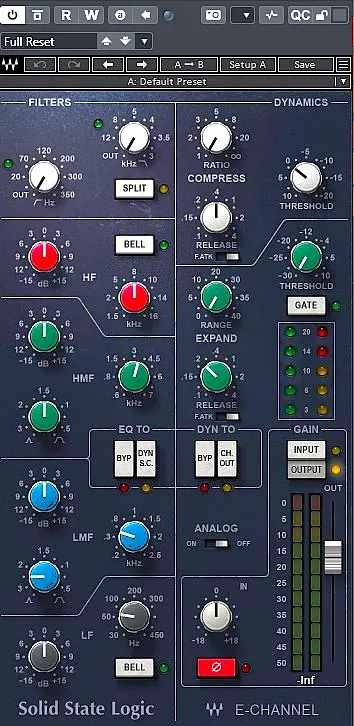
Waves SSL E-Channel is not just another plugin: it is direct access to the sound of one of the most influential mixing consoles in history. The SSL 4000 E-Series has shaped thousands of albums, from rock to urban music and modern pop. With this official emulation, Waves delivers a complete channel strip: EQ, compression, gate/expander, filters, routing and analog saturation.
Unlike ultra-clean modern EQs, SSL E-Channel brings character, punch, a controlled hint of aggressiveness, and a very distinctive dynamic behavior. It is designed for fast sculpting, bold decisions, and an immediately recognizable sonic identity. Where a transparent EQ corrects, SSL E-Channel sets an aesthetic direction.
In both home studios and professional environments, the goal of this plugin is not just to “fix the sound,” but to create a signature: an SSL color, with that slightly edgy grain that pushes mixes forward, especially on drums, vocals and electric guitars.
1. A Channel Strip Designed for Fast Workflow
The SSL philosophy is simple: do everything from a single module. E-Channel combines EQ, filters, compression, gate/expander and saturation in a compact, efficient interface. This is far from modern complex interfaces: everything is right in front of you, like on a real console strip.
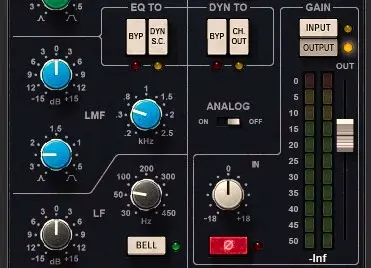
The workflow is immediate: you turn the knobs, you listen, you move on. No dropdown menus, no sub-windows, no visual distractions. This is what makes analog consoles so powerful: they encourage quick decisions, instinct, listening, and reduce the temptation to over-analyze curves instead of listening to the music.
1.1 From Analog Studio to Home Studio
The benefit of E-Channel for a modern home studio is obvious: you get the workflow of large consoles without having to invest in hardware. On every important track, you can open an SSL strip, set dynamics, EQ, filters and level, as if you had a 4000 E console under your hands.
This is particularly interesting if you like working in “blocks”: one strip for the lead vocal, one for the snare, one for the bass, one for guitars, etc. You can then approach your mix like an analog engineer: same architecture, same logic, but in digital.
1.2 Ergonomics & Readability
The plugin interface respects SSL’s design: clear color coding, well-separated sections, and a very readable vertical layout. It is quick to grasp if you already know consoles, but still accessible even if you are discovering this type of channel strip for the first time.
2. The SSL EQ: Aggressive, Musical & Effective
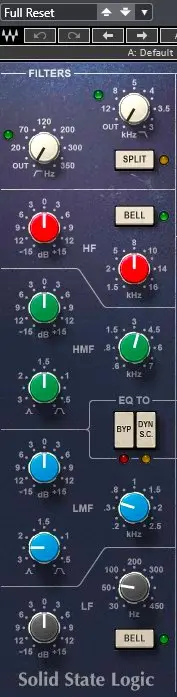
The SSL E-Series EQ is famous for its character: it can be surgical, but above all musical and punchy. The mid bands are particularly effective for making a vocal, guitar or snare cut through a dense mix.
Its behavior is far from neutral: boosts are often perceived as “pleasant,” with a subtle enhancement of presence and density. In practice, you often find yourself pushing harder than with a transparent EQ, precisely because E-Channel handles bold EQ moves very well.
2.1 The EQ’s Key Strengths
- Low Shelf / Bell powerful for grounding the low end and adding weight to kicks and bass,
- Low-Mid ideal for cleaning up mud or adding body to vocals and guitars,
- High-Mid extremely effective for bringing out presence, attack and vocal consonants,
- High Shelf bright yet controlled, to add air without turning your mix into a razor blade,
- HP/LP Filters musical and perfect for quickly removing what does not serve the low or high end.
The SSL EQ is not transparent: it colors, it pushes, it adds character. This makes it essential in modern mixes where you are aiming for a “record” sound, not just a clean one.
2.2 SSL EQ vs Transparent EQ
Compared to a modern EQ like FabFilter Pro-Q or a stock EQ, E-Channel is not the best choice for invisible micro-corrections. However, when it comes to giving a track a sonic signature, it excels. You use it to make a source exist in the mix, not just to align it with a theoretical curve.
2.3 Practical EQ Use Cases
On a slightly dull lead vocal, a boost around 3—5 kHz with the High-Mid band can immediately improve lyric intelligibility. On electric guitar, working the mids (1—2 kHz) helps it find its place without fighting with the vocal. On a snare, combining a high-end boost with a gentle low-mid cleanup gives that classic SSL “crack.”
3. Dynamics: Compression, Gate & Expander
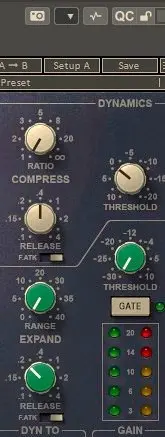
SSL dynamics are one of the most appreciated elements of the channel strip. They provide firm, fast control and an instantly recognizable sonic signature. This is not transparent compression: you can clearly feel its action, especially when you push the settings.
3.1 SSL Compression
E-Channel’s compression is fast and punchy, ideal for controlling transients. It is particularly well suited for:
- vocals that must stay clearly upfront in a dense mix,
- snares that need to hit hard,
- rhythm electric guitars,
- percussions and claps in urban productions,
- aggressive synths that need taming without losing energy.
By playing with ratio, threshold and release, you can obtain either subtle control or a clearly audible effect, almost “pumping” in a good way. This is that “console” effect that makes elements feel glued into the mix.
3.2 Gate & Expander
The SSL gate is one of the most respected in mixing history. Fast, precise, musical, it is still a standard for processing acoustic drums. The expander offers more progressive control, useful when you want to reduce rather than cut abruptly.
It is perfect for:
- cleaning toms in an acoustic kit,
- reducing background noise on vocal or guitar takes,
- tightening overheads that capture too much room,
- adding punch to drums by letting primarily the transients through.
3.3 Combining Compression & Gate
One of SSL E-Channel’s strengths is how compression and gate can work together. You can, for example, use the gate to clean a snare, then compression to add density. The result: a solid, clear snare, with very little noise between hits.
4. SSL Workflow: Gain Staging & Routing
SSL E-Channel lets you change the signal order: EQ †’ Dynamics or Dynamics †’ EQ. This simple switch radically changes how the plugin behaves and how dynamics react to tonal changes.
With dynamics before the EQ, you first control transients and overall level, then fine-tune the tone. With the EQ before dynamics, you shape the tone first, then compression reacts to the already-sculpted signal. Both approaches are creatively useful.
4.1 Gain Staging and Input Level
Gain staging is crucial with E-Channel. Pushing the input level engages more of the plugin’s analog-style behavior: slight saturation, natural compression, harmonic content. Conversely, a signal that is too low will sound cleaner, sometimes too tame.
A good habit is to aim for a consistent input level on all SSL-processed tracks, so saturation stays homogeneous throughout the mix. This brings your workflow closer to a real console.
4.2 Using SSL E-Channel on Buses
Even though E-Channel is designed as an individual channel strip, it works very well on buses too: drum bus, guitar bus, backing vocal bus, etc. A touch of compression plus some gentle EQ can glue a group of elements and give them a shared identity.
5. Mixing Applications
To fully understand SSL E-Channel’s value, you need to see it in real-world use. This plugin truly shines when it is used systematically across a mix on several key tracks, rather than as just another EQ in your list.
5.1 Lead Vocals
- Moderate high-pass to clean the low end (70—100 Hz),
- low-mid resonance cleanup around 200—400 Hz if the vocal sounds muddy,
- boost in the 3—5 kHz range for presence and intelligibility,
- optional high shelf above 10 kHz to add air,
- fast compression to stabilize the level and keep the vocal locked at the center of the mix.
The result often feels more “record-like” than with a chain of very transparent tools. You can clearly feel the SSL character: the vocal becomes solid, forward in the mix, without turning overly harsh if the settings are kept under control.
5.2 Drums
- Snare: boost around 200 Hz for body, 5 kHz for attack, firm compression for punch,
- Kick: cleanup around 300 Hz, reinforce the sub between 60—80 Hz, gentle compression for stability,
- Toms: SSL gate to remove noise between hits, EQ to add weight without cluttering the mix.
It is on drums that SSL E-Channel really shows its console heritage: you get that “rock” and “pro studio” character that so many productions try to emulate.
5.3 Electric Guitars
The SSL EQ excels at bringing out midrange without making the sound harsh. A guitar slightly buried in the mix can be brought to life by carefully working around 1.5—3 kHz, while keeping overly bright areas under control if needed.
Compression, used in moderation, helps maintain a consistent dynamic across different takes, especially in rock or metal productions where rhythm guitars must stay solid and steady.
5.4 Bass & 808
- Firm compression to stabilize level and avoid uncontrolled fluctuations,
- low-shelf boost to add weight, if the playback system can handle it,
- cleanup in the low-mid area to prevent masking of vocals and guitars.
On an 808 or synth bass, SSL E-Channel can add a more “live,” less synthetic feel, thanks to its subtle saturation and characterful compression.
6. Analog Coloration & Saturation
The Analog mode adds noise, grain and subtle saturation. It is a subtle effect, but it contributes a lot to the console-like feel. Some users disable it systematically, but many mix engineers keep it on across all strips to reinforce overall cohesion.
The saturation is not extreme: it is more about harmonic density and gentle natural compression than overdrive. It becomes especially noticeable when you push the plugin’s input level or when you stack multiple instances in a mix.
6.1 Layered Approach
Using SSL E-Channel on several key tracks (vocals, snare, bass, guitars) creates a kind of implicit “glue.” Even without a dedicated mix bus processor, the mere fact of sharing the same harmonic color creates a sense of cohesion. This is one of the reasons so many SSL-mixed records have such a recognizable personality.
7. Technical Architecture
From a technical standpoint, the plugin is light enough on CPU to be used on many tracks in a single project. This is essential if you want to follow the “one channel strip per track” philosophy. It is stable, and its behavior is predictable, which is reassuring for large sessions.
Waves has aimed to reproduce the non-linear behavior of the original console: interactions between EQ, dynamics and gain, progressive saturation, filter responses, etc. Even if it is not a perfect clone of every SSL console ever built (no two desks sound exactly the same), the spirit and sonic signature are very much there.
8. Competitors & Alternatives
8.1 SSL Native Channel Strip 2
The SSL Native version offers a more modern approach, with an updated interface and sometimes greater flexibility. It is slightly cleaner, a bit less aggressive than the Waves version, which may or may not fit your taste depending on the production style. If you are looking for a more “hi-fi” SSL tone, it is a solid alternative.
8.2 Brainworx SSL 4000 E
Brainworx plugins (such as bx_console SSL 4000 E) go very deep into modeling channel variations (“TMT”). They are excellent for recreating the illusion of a real console with strips that are all slightly different. The sound is very detailed and very effective on demanding rock and pop mixes.
8.3 Analog Obsession & Other Emulations
There are also free or very affordable emulations, notably from Analog Obsession and other independent developers. They can be interesting for discovering the SSL aesthetic, but Waves remains a historic reference, especially because its version has been used for years on thousands of productions.
9. Strengths, Limitations & Ideal Users
Strengths
- Authentic, instantly recognizable SSL sound,
- Punchy, musical EQ capable of strong moves without destroying the source,
- Fast, effective compression for punch and stability,
- Legendary gate, especially on acoustic drums,
- Ultra-fast workflow, ideal for real-world mixing decisions.
Limitations
- No Mid/Side or multiband dynamics,
- Coloration sometimes too strong for very minimalist or acoustic contexts,
- Less flexible than a modern EQ for complex surgical work.
Best Suited For
- Beatmakers and producers who want a “record” sound quickly,
- Modern mixers working on rock, pop, hip-hop, electronic music,
- Home studios looking for a shortcut to a true pro studio aesthetic,
- Engineers who like to work like on a console: one strip per track, fast decisions, bold character.
Conclusion: An Essential Classic
Waves SSL E-Channel remains one of the most widely used channel strips in the world, and for good reason. It is fast, musical, colorful, and instantly brings a professional identity to your sound. Far from being just another EQ or compressor, it is a true “control center” for every important track in your mix.
If you want to bring the workflow and punch of a real SSL console into your DAW, E-Channel is a must-have. Used intelligently, it can transform a static mix into a lively, dense and cohesive production–whether you are working in a home studio or a professional environment.